
The short answer on which carousel app for Instagram to use: if you want this week's carousel without designing anything, ZapPost delivers it assembled for US$19 a month; if you want to design it yourself for free, Canva and Edits both have a free option; if you want a continuous carousel, where one photo runs from one slide into the next, SCRL was built for that. Below are the 8 apps, with what each one does, what is left to you and what it costs.
Every price was checked on October 29, 2026, on monthly billing, each linked to the page it came from. For Canva, Adobe Express, SCRL and ChatGPT we used the official app page on the US App Store, where the price is public. Prices in other countries and on Android may differ.
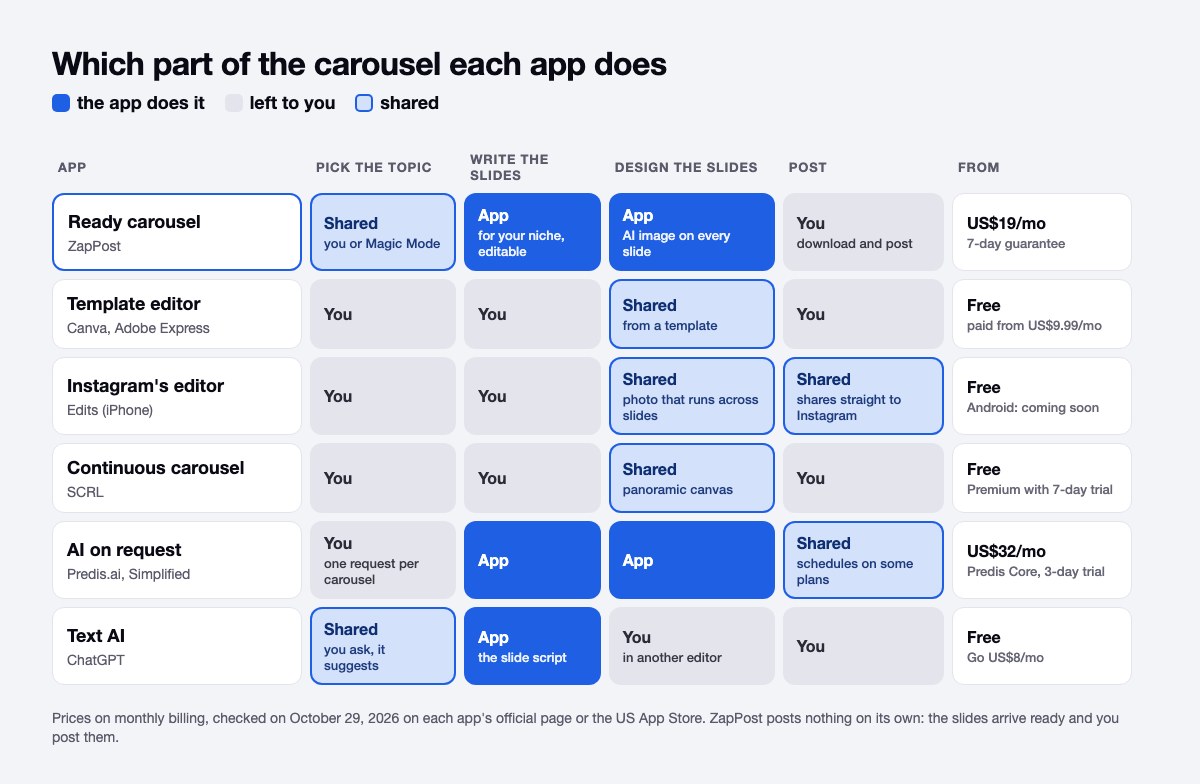
The 8 carousel apps for Instagram, side by side
The 8 apps fall into three groups by who does the work: one delivers the carousel ready, four give you an editor and three generate on request or write the script.
| App | How it builds the carousel | Starting price (monthly) | Free? |
|---|---|---|---|
| ZapPost | Delivers the slides ready for your niche, with text and an image on each | US$19/mo (Monthly) | 7-day guarantee |
| Canva | You build slide by slide from templates | US$14.99 to US$18/mo (Pro) | Yes |
| Adobe Express | Template editor similar to Canva, cheaper | US$9.99/mo (monthly plan in the app) | Yes |
| Edits | Instagram's carousel editor, with a canvas where a photo runs across slides | Free | Yes, iPhone only for now |
| SCRL | Panoramic canvas for continuous carousels | Free download; monthly or yearly Premium | Yes, with a 7-day Premium trial |
| Predis.ai | Generates the carousel from a topic, on credits | US$32/mo (Core, 1,300 credits) | No, 3-day trial with a card |
| Simplified | AI studio with text, image and video, billed per campaign | No single price: the official page shows different prices for the same plan | No, trial only |
| ChatGPT | Writes the slide script; the visuals stay with you | Free; Go at US$8/mo in the app | Yes |
How many slides a carousel really has
Of the 4,032 carousels created in ZapPost between June 15 and August 31, 2026, 51% have exactly 4 slides, and only 5% reach 10, according to our study on when small businesses create content. Small-business carousels run short: one idea, two or three supporting points and a closing slide with a call to action. If your block is believing you need 10 beautiful slides, that number should put it to rest.
Instagram's ceiling is far above that. Since August 2024, one carousel takes up to 20 photos or videos, per Instagram's confirmation reported by Social Media Today. That limit suits an event album or a long before and after. To teach something, four to eight slides are enough. ZapPost's help page suggests 4 to 5 slides for a quick tip and 6 to 8 for content that teaches.
What to put on each slide of a 4-slide carousel
Since 51% of the carousels made in ZapPost have 4 slides, per the same study, it pays to have a fixed structure for that size, whatever app you use:
- Slide 1, the hook: a promise or a question the person wants answered. It is what they see first in the feed, so it carries most of the weight.
- Slides 2 and 3, the content: one point per slide, with a short sentence and large type. If a point does not fit, split it into two slides.
- Slide 4, the close: what to do now. Save it, send a message, book a time.
That structure works for the salon, the clinic and the corner shop. What changes is the topic, and that is what the ideas hub at the end of this article is for.
Getting it ready: ZapPost
In ZapPost's carousel maker, an 8-slide carousel with images costs 1 daily action and 240 credits, because each slide with an AI-made image uses 30 credits, according to the carousel creator help page. The text comes from the day's action and the images come from credits.
The steps:
- In the Studio, tap "New Carousel" and pick the type: "With AI Images", which writes the text and creates the image from your topic, or "YouTube + AI Images", which summarizes a video from its link.
- Pick the visual template every slide will follow.
- Set the number of slides and the topic. If you do not know what to talk about, Magic Mode picks the topic from your profile.
- Review the text. You can rewrite any slide before the images are generated.
- Download. The slides come out as images, in order, ready to upload to Instagram.
It costs US$19 a month on the Monthly plan, or US$11.50 a month on the 6-month plan (US$69 every six months), with a 7-day guarantee and no lock-in. Besides the carousels you create in the Studio, a notification arrives on your phone every day with a post ready for your niche. ZapPost does not post for you: you download the slides and upload them yourself.
The limit to know: ZapPost is no image editor. You can change the text on each slide, but whoever wants to move every element of the design will prefer Canva. Whoever wants this week's carousel solved without opening an editor will stick with it.
Building by hand: Canva and Adobe Express
Canva has a free plan, and Pro shows up at US$14.99 to US$18 a month on the US App Store, with carousel templates to build slide by slide. Adobe Express does the same for less: its monthly plan is US$9.99 on the official app page, and the download is free.
In both, the work is yours: choose the template, write each slide, keep the sequence making sense and export at the right size. It works well for people with an eye for design and a free hour for each carousel. If you already use Canva and want to know what to do when time runs out, see how to create Instagram content without Canva.
Where manual breaks: the first carousel comes out fine. Around the tenth, in a busy week, the editor becomes a queue of open drafts.
How to make a carousel in Edits, Instagram's editor
Since October 7, 2026, Instagram's Edits app has a carousel editor, on iPhone only for now, with Android announced as "coming soon". The announcement came out on the official Edits blog and was reported by Social Media Today. Edits has been free since its launch in April 2025 and exports without a watermark, according to the official app announcement.
The steps Instagram describes:
- Open Edits and go to the projects tab.
- Tap the (+) button and choose "Carousel".
- Select the photos and videos that go in the carousel.
- Lay them out on the canvas. The + adds a blank slide, and you can duplicate slides and reorder them.
- Edit with audio, text, filters, adjustments and cutouts.
- Share straight to Instagram.
The real novelty is the canvas: a photo can bleed from one slide into the next, and a headline can also run across several. Before October 7, that effect was built in another app, such as SCRL. The announcement mentions no price and no slide limit specific to the editor. As in Canva, the text and the idea stay with you.
Which app makes a continuous carousel: SCRL
SCRL is rated 4.8 from about 127,000 ratings on the US App Store, and its listing describes panoramic layouts, precise alignment and transitions that flow from slide to slide. The download is free, and Premium has monthly and yearly plans with a 7-day trial.
A continuous carousel works like this: you build one long canvas, place the photo or the text over the break between slides, and the app cuts everything into pieces of the same size. When the person swipes, the image carries on. It suits showing a space, a portfolio or a before and after with more impact than separate slides.
SCRL shows many different prices inside the app, depending on plan and length, so we give no single figure: check your country's store before subscribing. If you have an iPhone and only want the photo-across-slides effect, try the Edits editor first, since it is free.
Generating on request: Predis.ai and Simplified
Predis.ai charges US$32 a month on Core, with 1,300 credits, or the equivalent of US$19 a month when you pay for the year (US$230), and the trial lasts 3 days with a card: the page says the charge comes when day 3 ends. It generates the carousel from a topic and uses the logo, colors and tone of the brand you set up. Core has no auto-posting; that sits on the higher plans.
Simplified sells campaign bundles: one social campaign produces a batch of 6 posts, and each extra campaign costs US$10 on any plan. Post scheduling is included. Its pricing page shows different prices for the same plan, so check there before you subscribe.
Both work on demand: each carousel is a request from you, with a review by you, and you decide the topic of each one. We listed the paths beyond them in Predis.ai alternatives.
Script by AI, visuals by you: ChatGPT
ChatGPT is free and the Go plan costs US$8 a month on the US App Store (Plus is US$19.99); it builds no visuals, but it writes slide structure well. Ask for "a 5-slide carousel about X, hook on the first slide, call to action on the last" and take the text to Canva or Edits.
The hidden cost is assembly: copying each slide, choosing an image, adjusting type size and checking that everything fits. The full cost of that time is in ZapPost vs ChatGPT.
The best free carousel app for Instagram
The free combination that works today uses 2 apps: free ChatGPT for the script and Edits (on iPhone) or Canva's free plan for the visuals. Here is how:
- Ask ChatGPT for the text of 4 slides: one with the hook, two with the content and one with the close.
- Open a carousel template in Canva, or a new carousel in Edits, and paste the text slide by slide.
- Use the same font and colors on every slide, so it reads as one piece.
- Export the slides in order.
- Post on Instagram by selecting multiple photos in the same post.
You pay nothing, but you pay in time: writing, assembling and adjusting each carousel. If you make one a week, it fits the schedule. If you want three a week, the math changes, and it is worth comparing the price of an app that delivers the slides ready with what your hours are worth.
How to post the carousel on Instagram
On Instagram, a carousel is one post with several photos or videos, and it takes up to 20 items. You tap the create button, choose post, turn on multiple selection and tap the slides in the order they should appear. The full walkthrough, including what you can change after posting, is in how to post multiple photos on Instagram.
Two habits save you from redoing the work. First, export every slide at the same size, so the carousel looks even when swiped. Second, check the order before sharing, because the carousel tells a story and slide 3 out of place breaks the thread.
How to choose a carousel app for Instagram
The choice comes down to 1 question: which part of the work you want off your plate.
- Want it ready every week, with no design? ZapPost.
- Have time and enjoy design? Canva, or Adobe Express to pay less.
- Have an iPhone and want the photo running across slides for free? Edits.
- Want a panoramic carousel with more control? SCRL.
- Want to prompt an AI and review each one? Predis.ai or Simplified.
- Only stuck on the slide text? ChatGPT plus the editor you already use.
And if the doubt is what to put on the slides, the ideas by profession hub has ready carousel ideas for each niche. To compare caption tools, see the best caption generators.
ZapPost delivers the carousel, the Reels script and the caption ready to go. No writing prompts, no Canva, no new tool to learn. You review and publish.
Frequently asked questions
What app makes a continuous Instagram carousel?
SCRL is the best known for it, with a panoramic canvas that cuts the image into slides. Since October 7, 2026, the Edits carousel editor also lets a photo run from one slide into the next, on iPhone only for now.
Is the Crsel app available for Android?
We could not confirm it on an official page, so check Google Play before counting on it. Edits, from Instagram, has announced its carousel editor for Android as coming soon.
How many photos can an Instagram carousel have?
Up to 20 photos or videos since August 2024. Across the 4,032 carousels created in ZapPost between June and August 2026, 51% have 4 slides, so the carousel that works for a business is usually much shorter than the limit.
Can I make carousels for free?
Yes: free ChatGPT for the script, and Canva's free plan or Edits on iPhone for the visuals. The cost becomes your time to write, assemble and adjust.
Are carousels better than reels?
We found no official Instagram number comparing the two formats. What can be said is that a carousel only works if the first slide gives a reason to swipe: the hook matters more than the format.
Can I edit the carousel ZapPost delivers?
You can rewrite any slide before the images are generated. ZapPost is no image editor like Canva: people who want to redesign every element use both, the structure from one and the brush from the other.