Ten slides ready without opening Canva.
You say the topic, pick one of the eight visual templates and the number of slides. The carousel comes back built, with text and images, ready to download and post.
From 3 to 10 slides. Works for Instagram and LinkedIn.
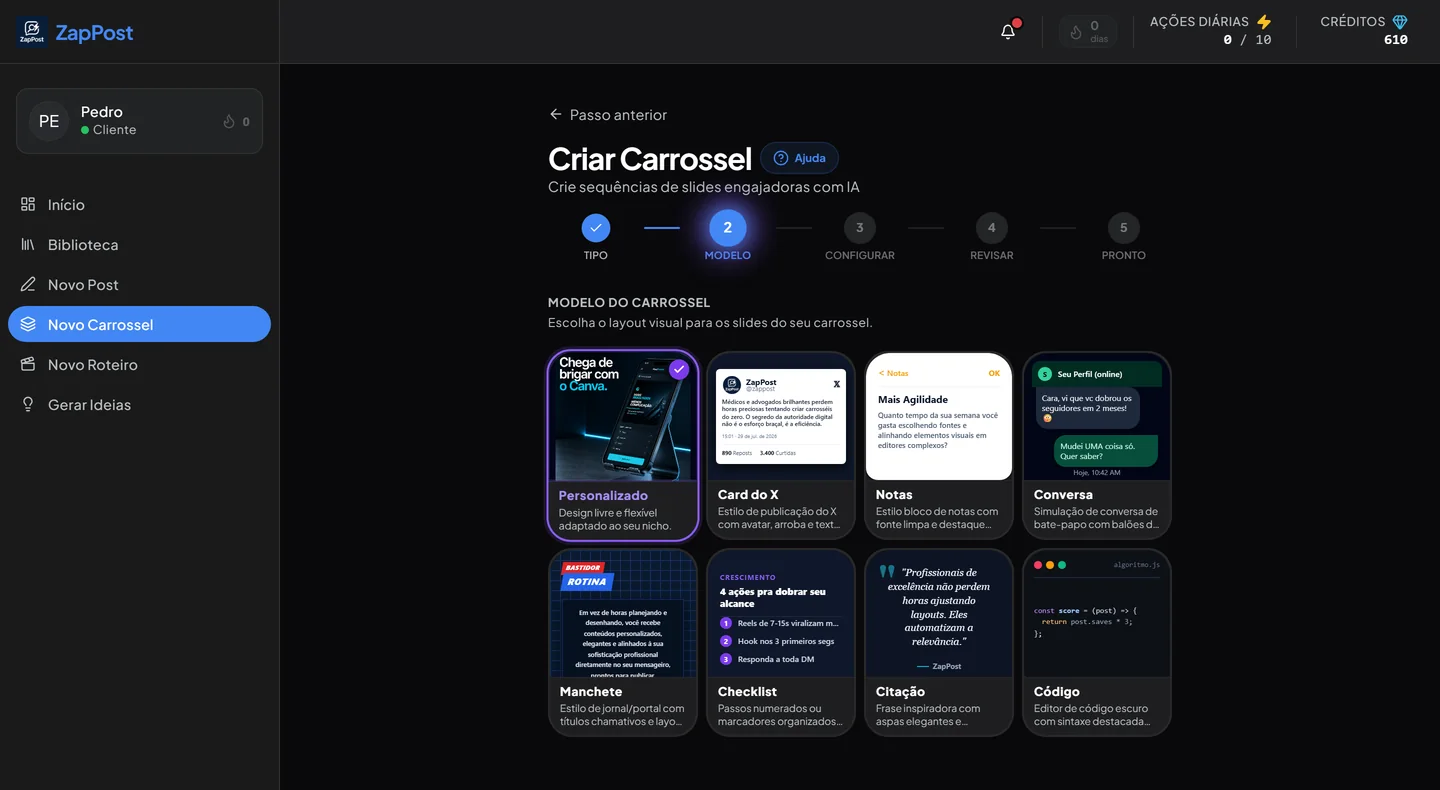
Picking the template: eight different visual styles, from free-form design to a screenshot of a chat. This is the step that changes the look of the whole carousel.
Four choices and the carousel exists
None of them involves dragging a text box around or hunting for the font you used last week.
Pick the type
A carousel with images made by artificial intelligence, or a carousel built from a YouTube video that turns into slides.
Pick the template
Eight visual styles: free-form design, social card, notepad, chat thread, newspaper headline and three more.
Say the topic and the size
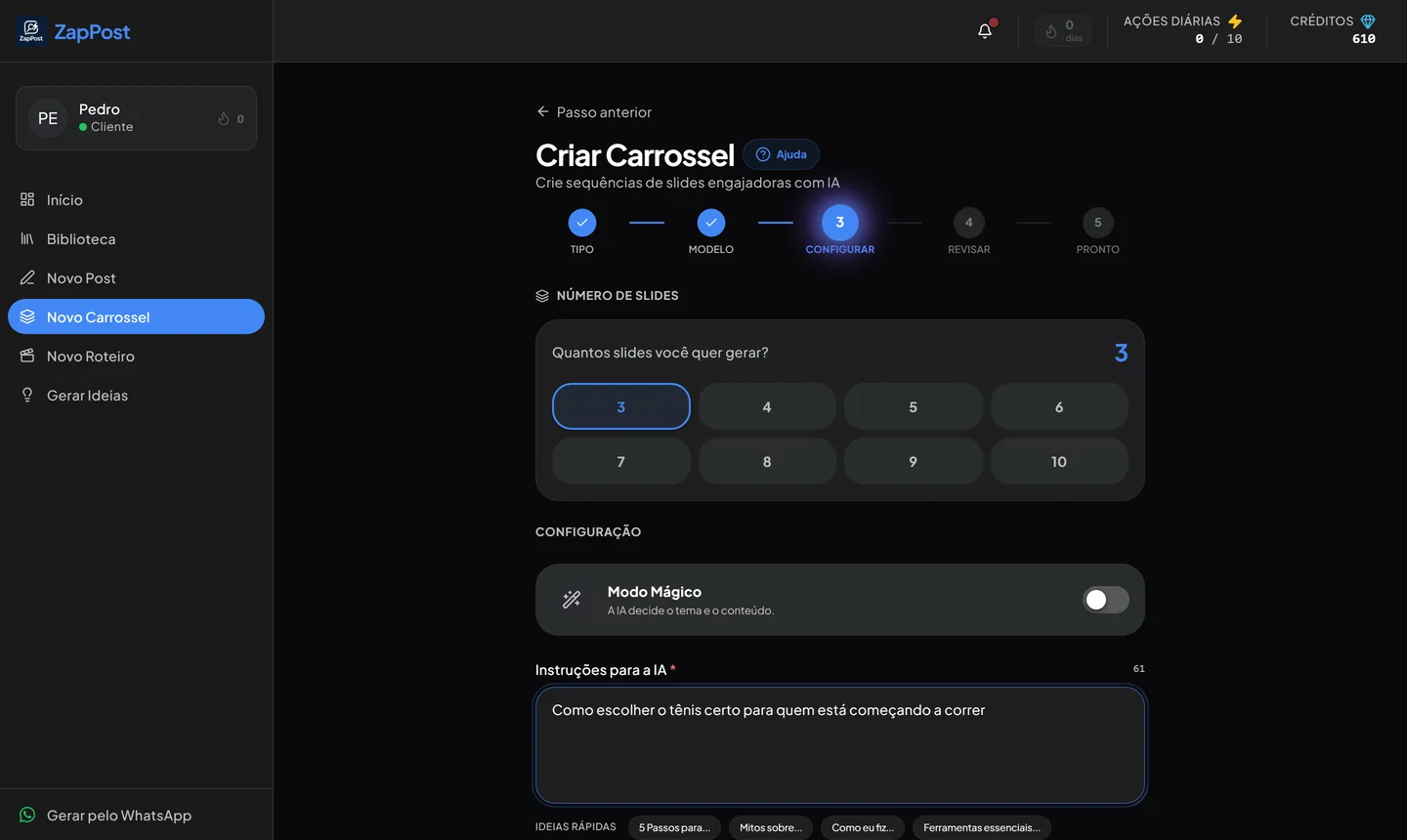
From 3 to 10 slides, with one sentence explaining the subject. Credits are charged per slide and the cost shows up before you generate.
Review and download
You see the carousel built, slide by slide, with the caption next to it. Download the images and post.
Eight templates, eight different looks
The same text changes tone completely depending on the template. That is what keeps your account from looking like every other account that posts from the same place.
You decide the size
Three slides for a quick message, ten to teach something properly. The app shows the cost first, so there is no surprise at the end.
- From 3 to 10 slides, picked with one tap.
- Magic Mode decides the topic and the content when you would rather not think.
- The image on each slide is generated along with the text, on the same subject.
Why the carousel is still the easiest format
This is not a trend. It solves three problems that video does not solve for someone running a small business.
It gives you a second chance
When someone swipes from the first slide to the second, Instagram reads that as content that held attention, and it shows the post again to people who did not interact, this time with the second slide in front. It is the only format that gets a second cover for free.
A photo has one chance to stop the thumb. A carousel has two.
You do not have to be on camera
Most people who freeze up at posting time freeze up for this reason: they do not want to film their own face, they do not like their own voice, they have nowhere quiet to record. A carousel gives you authority without any of that. Just text and images, on your subject.
People save it, and saves are worth a lot
Content in steps, lists or checklists is what people keep to look at later. And a save is one of the strongest signals there is for Instagram: it shows the post was worth someone’s time, not just a distracted tap on the heart.
The structure that works, slide by slide
- Cover: a clear promise. “3 mistakes that make your clients disappear” beats “customer service tips”.
- Middle slides: one idea per slide, in a short sentence. If you have to shrink the type to fit, that is two ideas.
- Second to last: the summary. This is the slide people screenshot or save.
- Last: the invitation, and a small one. Comment a word, save, follow. Never all three at once.
That is the order the tool follows when it builds the slides. You can change all of it afterwards, but the skeleton already stands up.
Questions that always come up
Do I need to know Canva or Photoshop?
No. There is no visual editing screen: you pick the template, say the topic and get the slides finished. Anyone who wants to tweak them later can download the images and edit them wherever they prefer.
How much does it cost in credits?
A carousel is charged per slide, and the amount shows on screen before you generate. A 3 slide carousel costs less than a 10 slide one. It is the most expensive tool in the app because every slide has an image generated for it.
Are the images from a stock library?
No. They are generated for that carousel, on its subject. That is why the result does not have the stock photo look you have already seen on somebody else’s profile.
Can I post it on LinkedIn too?
You can. The square and vertical formats work on both, and some templates, like the quote and the checklist, tend to do well there.
Can I turn a YouTube video into a carousel?
You can. It is the second type on the first screen: you point at the video and it becomes a sequence of slides with generated images. It is a way to reuse content you have already recorded.
The other tools
All in the same app, with the same profile of your business behind them.
Your next carousel can exist already.
Pick a template, say the subject and watch the slides come together in front of you.
Results vary by niche and consistency.