“I have no idea what to post” ends here.
Say the subject in one sentence and get eight content ideas, each with a summary of what to say. Picked one? It turns into a post, a carousel or a script in one click.
Included in your plan and it does not use credits.
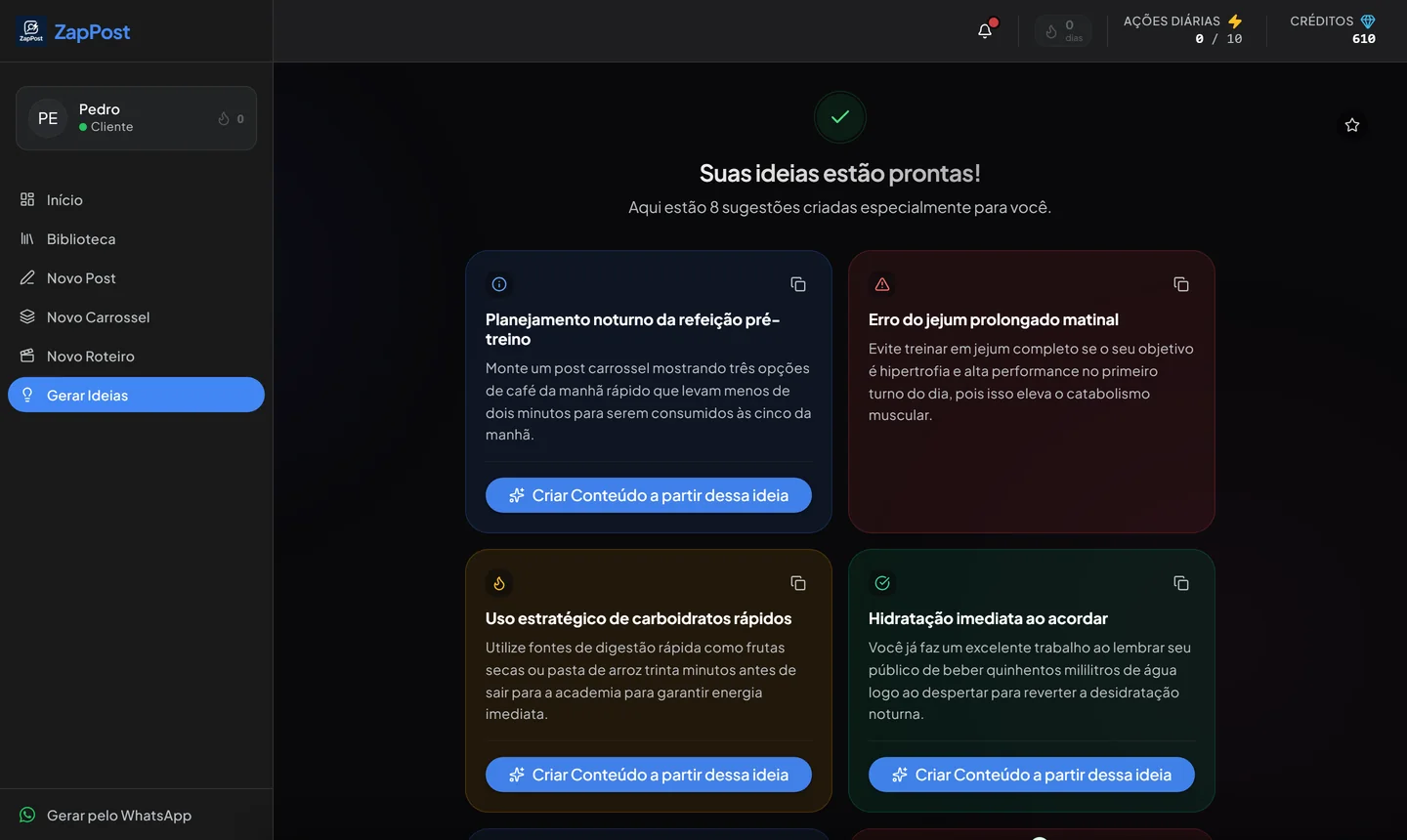
A real result, generated in the app on August 7, 2026 from the topic “sports nutrition for people who train in the morning”.
From a blank screen to eight directions
The whole cycle takes less than a minute, and it does not stop at the idea: it becomes content right there.
Say the subject
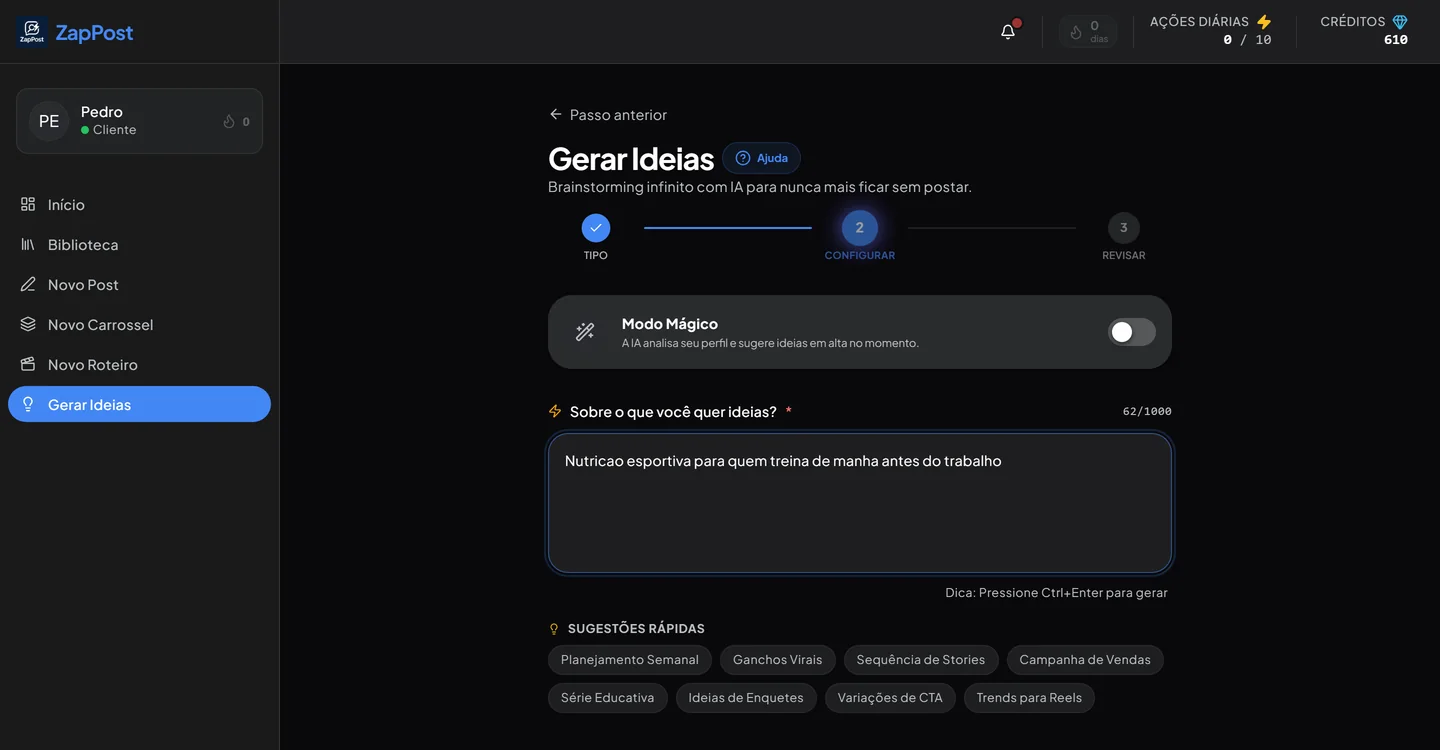
“Sports nutrition for people who train in the morning” is enough. Or turn on Magic Mode, which reads your profile and suggests what is picking up in your niche.
Get eight ideas
Each one comes with a title and a summary of what to say, not just a loose topic. Five seconds is enough to tell whether it works for you.
Copy them or ask for more
Copy one, copy all of them at once, or ask for another eight. It costs no credits, so you can keep going until the right idea shows up.
Turn it into content
The “create content from this idea” button takes the topic straight into the post, carousel or script generator.
Inside the tool
It is the simplest tool in the app, and the one most people use before any of the others.
One field and one button
There is no briefing form, no tone of voice picker, no audience selector. One sentence about the subject, and the app already knows the rest from your business profile.
- Magic Mode looks at your profile and suggests what is picking up right now.
- Eight ready-made idea types sit right under the field.
- A keyboard shortcut generates without taking your hands off the text.
The idea generator is included in every ZapPost plan and it does not use credits: it only uses one of your daily actions. So it is not a tool that is open to everyone, it is a feature of the plan you already pay for, and using it does not eat into the credits you saved for carousels and posts with images.
Eight kinds of idea with one tap
Each suggestion completely changes what comes back. “Weekly plan” returns a whole week. “Viral hooks” returns nothing but opening lines.
All of them available without spending a single credit.
How to plan a week without stalling on Wednesday
Having eight ideas is easy. What makes the difference is how you pick which ones become posts, and in what order.
Every business posts three things, not one
People who stall are usually trying to post only one kind of content: all promotions, or all tips. An account that works rotates between three roles.
- Teach: answer a small question your client has. This is what brings new people in and what people save.
- Show: behind the scenes, before and after, the work being done. This is what builds trust with people who do not know you yet.
- Sell: the price, the offer, the open slots. Without this one, the other two turn into a hobby.
The ratio that tends to hold up is two teach or show posts for every one that sells. It is not a golden rule, it is what keeps the account from reading like a flyer.
A sample week
Five posts, two days off. Nobody has to post every day, they have to post consistently.
Pick the ideas on Monday, not in the moment
What breaks consistency is not a shortage of ideas, it is the cost of deciding with the app open and the day running out. Generating the ideas all at once, picking five and writing them down takes ten minutes on a Monday morning and settles the whole week.
Since this costs no credits, you can generate two or three times until the list is good, and only then turn the chosen ones into real content.
One good idea makes three posts
“Three mistakes when you send a quote” is a carousel, a Reels and a Stories sequence. Different formats, different people seeing them, and none of it feels repeated. Reusing is not laziness, it is what lets one person keep a profile alive.
Questions that always come up
Is it really free?
It is included in the plan, which is not the same thing. Anyone subscribed to ZapPost uses the idea generator without spending credits, as many times as they want within their daily actions. Without a plan there is no access.
How many ideas come at a time?
Eight, each with a title and a summary of what to say. If none of them works, the generate more button gives you another eight, at no credit cost.
Will the ideas fit my niche?
They start from the subject you write and from your business profile. The more specific the subject, the better: “sports nutrition for people who train in the morning” gives you more than “health”.
Can I turn an idea into a post right away?
You can. Every idea has a create content button that takes the topic straight into the post, carousel or script generator. That is where the credit cost of the tool you pick comes in.
Can I save the ideas for later?
You can copy them one by one or all at once, and paste them wherever you plan your week. The ones you turn into content stay in the app library.
The other tools
All in the same app, with the same profile of your business behind them.
Your week can be settled today.
Ten minutes now and you stop opening Instagram without knowing what to post.
Results vary by niche and consistency.