The caption is ready before your coffee gets cold.
You write one line about what you want to say. Back comes the text formatted for Instagram, with emojis, line breaks and a block of hashtags from your niche, ready to copy and paste.
Works on desktop and on your phone. Nothing to install.
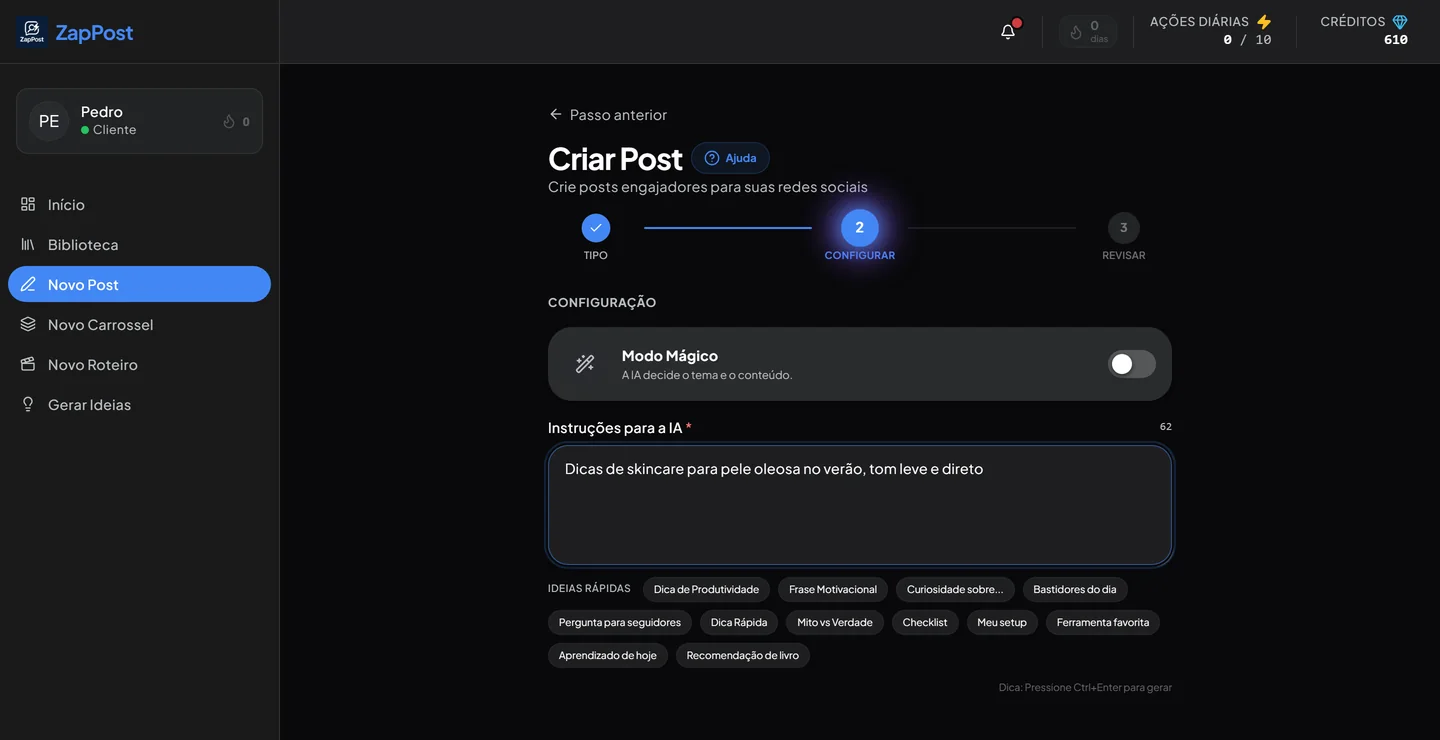
The real screen: you describe the topic in one line and the artificial intelligence returns a title, a caption and hashtags.
Four steps, none of them hard
The way the screen asks, in the order it asks.
Pick the type
Text with an image generated by artificial intelligence, or text with your own photo. Either way the caption comes out formatted for Instagram.
Say the topic
One line is enough: “skincare tips for oily skin”. If you have no idea what to post, turn on Magic Mode and the artificial intelligence picks it from your profile.
Review and adjust
Read it, change whatever does not sound like you and ask for another version as many times as you need. Nothing is published until you say so.
Copy and publish
The text goes to your clipboard with the line breaks in the right places. You paste it into Instagram and publish.
Inside the tool
What you see the first time you open it, with no preparation at all.
Two ways to build the same post
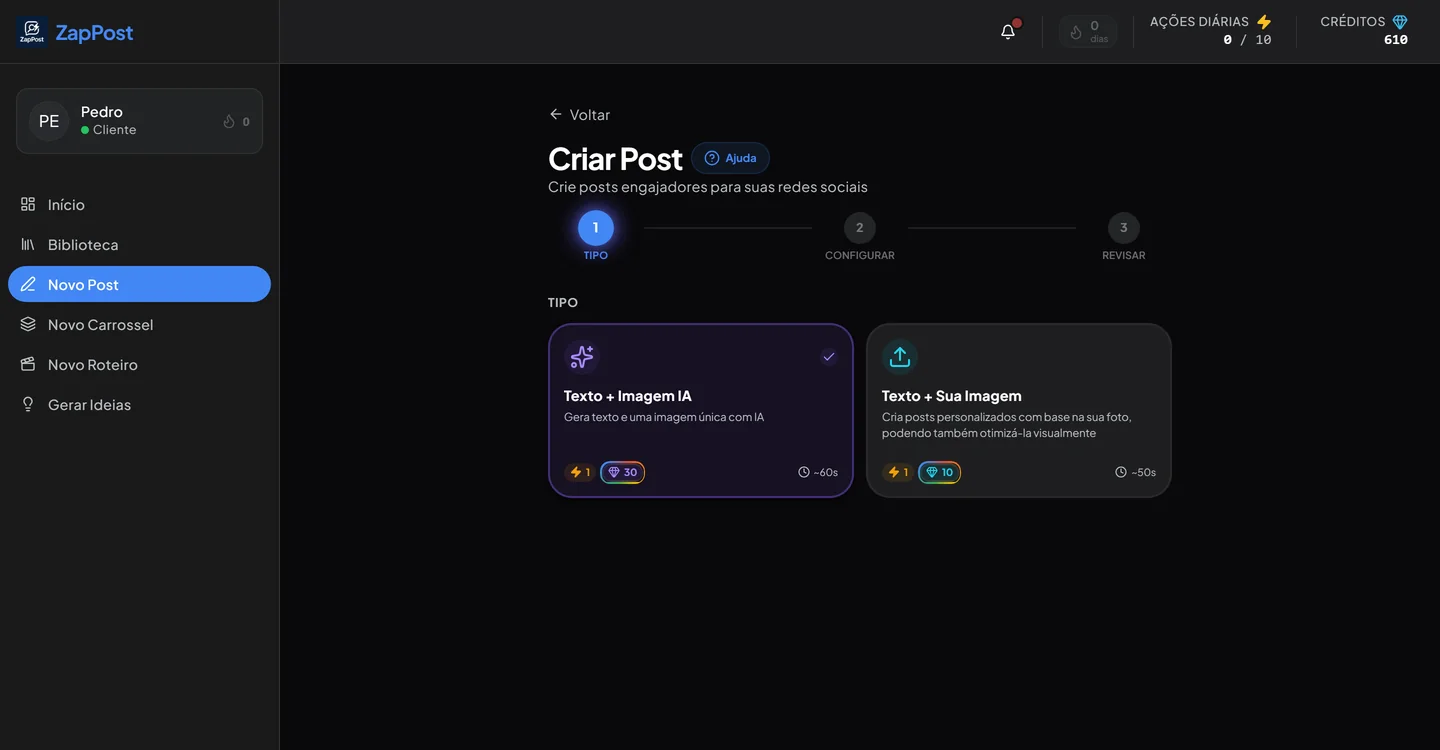
The choice is right on the first screen, and it changes what the artificial intelligence does with the image.
- Text and an AI image: the image is born together with the text, on the subject of the post, with no generic stock photo.
- Text and your image: you upload your photo and it is adjusted to the Instagram format.
- The cost in credits and the waiting time show up on the card itself, before you choose.
Twelve shortcuts for when your head goes blank
Below the instructions field there is a row of ready-made topics. You click one and it becomes the starting point of the text, which is still tuned to your business.
The same shortcuts exist in the script generator, with video topics.
How to write a caption that stops the thumb
It holds for the caption that comes out of here and for the one you write yourself. Four rules, none of them about writing prettily.
The first two lines decide the rest
Instagram cuts the caption at the “more”, and that is where the person decides whether to open it. Start with the pain, the number or the question, never with an introduction.
your.profile Does your skin still shine by late afternoon? The problem is probably not the sunscreen.
Instagram cuts here
I tried four sunscreens last summer and what changed was not the brand… more
One idea per paragraph
A solid block of text on a phone looks like work. The same words in chunks of one or two lines look like a conversation. The caption already comes out of here with the breaks in place.
The ask at the end has to be small
The bigger the ask, the fewer people do it. Ask for one thing only, and one that fits in a single tap: comment a word, answer yes or no, save the post.
A hashtag is context, not a raffle
Thirty hashtags off a ready-made list do not take the post to more people. Five to ten from your niche tell Instagram what it is about. That is how the block comes out of the tool.
Questions that always come up
Do I need to know how to write prompts?
No. One line in plain English does it, the way you would explain it to a new employee. “Post about Tuesday’s promotion” is already enough. If not even that comes to mind, Magic Mode picks the topic from your profile.
Does this use credits from my plan?
It does. How much each type costs shows up on the card itself, before you choose, along with the average waiting time. A post with your own photo costs less than a post with a generated image, because the image is already yours.
Can I use my photo instead of an artificial intelligence image?
You can, and for many businesses it works better. A photo of your product, your space or your finished work beats any generated image. You upload the photo and get the text built on top of it.
How does it know what makes sense for my business?
From the profile you fill in once: what you do, who for, and the tone you use. That is what separates a nutritionist’s caption from a mechanic’s caption, even when the topic is the same.
Does the text really come out ready to publish?
It comes out formatted and editable. The recommendation is always to read it before posting and change whatever does not sound like you. It takes fifteen seconds and it is what separates a post of yours from a robot’s post.
The other tools
All in the same app, with the same business profile behind them.
Your next post can come out right now.
Go in, describe the topic in one line and watch the text come together. If you do not like the result, ask for another.
Results vary by niche and consistency.