The best app to make Instagram posts depends on which part of the work you want off your plate. ZapPost hands you the whole post ready for your niche, Canva and Adobe Express help you design it from a template, Edits and CapCut edit your Reels, and ChatGPT writes the caption. Predis.ai, Ocoya and Simplified sit in between: they generate the post when you ask, one request at a time.
For many small business owners, the post gets made after hours. Of the 4,032 carousels created in ZapPost between June 15 and August 31, 2026, 39% were made before 8am or after 6pm, according to our study on when small businesses create content. That is why this comparison is organized by how much of each post the app does for you.
Prices below were checked on October 27, 2026, on monthly billing, and each one links to the page it came from. For Canva, Adobe Express, CapCut and ChatGPT we used the official listing on the US App Store, where the price is public.
Which app to make Instagram posts fits each job?
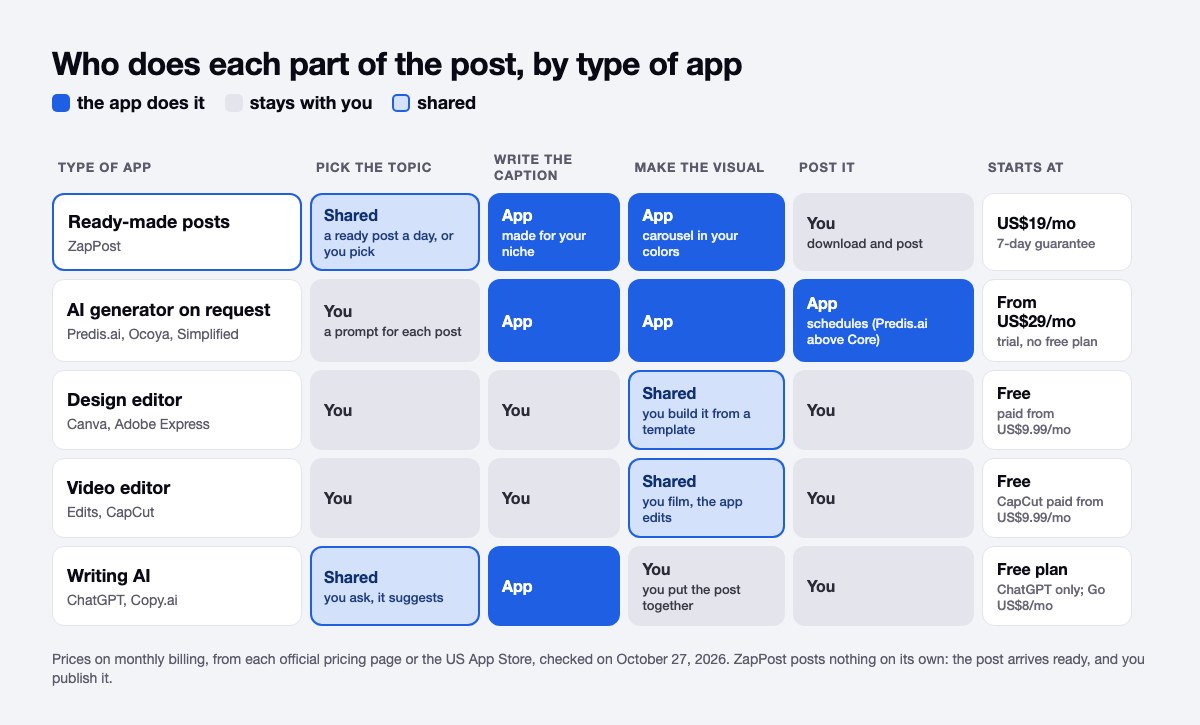
Ten apps cover the four jobs behind every post: picking the topic, writing the caption, making the visual and posting it. The table shows what each app does and its cheapest monthly price.
| App | What it does | Starting price (monthly) | Free plan? |
|---|---|---|---|
| ZapPost | Delivers the carousel, Reels script and caption ready for your niche | US$19/mo (Monthly) | No, 7-day guarantee |
| Canva | Editor where you build each post from a template | US$14.99 to US$18/mo (Pro) | Yes |
| Adobe Express | Template editor by Adobe, similar to Canva | US$9.99/mo (monthly, in the app) | Yes |
| Edits | Instagram's own app for editing Reels | Free | Free app |
| CapCut | Video editor by ByteDance | US$9.99/mo (Standard, in the app) | Free download |
| ChatGPT | General AI: writes the caption, you put the post together | US$8/mo (Go, in the app) | Yes |
| Copy.ai | AI chat for marketing copy, 5 users included | US$29/mo (Chat) | Not shown on the pricing page |
| Predis.ai | Generates the post with AI on request, in your brand's look | US$32/mo (Core, 1,300 credits) | No, 3-day trial |
| Ocoya | Generates text and images on credits, schedules in the same panel | US$29/mo (Starter, 300 credits) | No, 7-day trial |
| Simplified | Text, image and video AI in campaign packs | No single price: the official page shows two prices for the same plan | No, trial only |
Which app makes the whole post for you?
ZapPost is the app that hands you the whole Instagram post: the carousel, the caption with a call to action and the Reels script, written for your niche. It costs US$19 a month on the Monthly plan, with no lock-in and a 7-day guarantee.
You start by adding your profile's @, and ZapPost reads your business from there: the niche, what you sell and your colors. Every day a notification arrives on your phone with a post ready to download and publish. When you want something else, you open the Studio, choose a carousel, a Reels script or a caption, say the topic and get it on the spot. On a busy day, that means opening the notification between two clients, checking the text and posting, with no editor open.
There are limits worth knowing before you subscribe. Each text uses one of the daily actions your plan includes, and each image the AI makes uses credits, as explained in how daily actions and credits work. ZapPost writes the Reels script, and you record the video. It posts nothing on its own: you download the post and publish it. And it is no editor, so if adjusting every pixel is the part you enjoy, Canva serves you better.
Which apps are best for designing Instagram posts yourself?
Canva and Adobe Express are the best apps for designing an Instagram post yourself, because both start you from a ready template and both have a free plan that works. Canva Pro shows up at US$14.99 to US$18 a month on the US App Store. The Adobe Express app is also free to download, and its monthly plan costs US$9.99 on the US App Store, a few dollars less than Canva Pro.
Both apps leave the same work with you: choose the template, swap the text, adjust the colors and export, for every post. That fits a launch or a special date. For posting every week, it is where the cycle of opening the editor, fiddling with the layout and closing it without publishing usually starts. We wrote about that cycle in how to create content without depending on Canva, and compared the options in Canva alternatives.
Which app is best for Instagram Reels?
Edits is the best free app for Instagram Reels, because Instagram built it for that job. Instagram launched Edits on April 22, 2025, free on the App Store and Google Play, with a frame-accurate timeline, a high-quality camera and exports without a watermark, according to the official announcement. You sign in with your Instagram account, and the app shows performance insights on what you post. In its first-anniversary post, in April 2026, Meta listed a teleprompter whose text size and speed you adjust as you read, and an Ideas tab where saved reels and audio sit next to notes for your next video.
Exporting without a watermark helps because Instagram's ranking explainer, signed by Adam Mosseri, says Instagram makes watermarked and low-resolution reels less visible. A video exported from another app with a logo in the corner starts at a disadvantage.
CapCut, a video editor by ByteDance, is the other common choice. The app is free to download, and the Standard subscription costs US$9.99 a month on the US App Store. Whichever editor you pick, the video is still yours to film. If what stops you is knowing what to say on camera, ZapPost writes the Reels script, with the hook, the middle and the call to action, for you to record.
Which app writes Instagram captions?
ChatGPT is the simplest app for writing Instagram captions: it has a free plan, and Go costs US$8 a month when you subscribe in the iPhone app. It handles captions, post ideas and replies to customers. The Chat plan at Copy.ai gives you OpenAI, Anthropic and Gemini models for US$29 a month with 5 users, which helps when two or three people share the work.
What stays with you: a writing AI hands you text, and the post still has to be put together. The image, the crop and the posting stay with you, so you trade writer's block for an assembly line of your own. We did the full math in ZapPost vs ChatGPT.
Which AI apps generate the post when you ask?
Predis.ai, Ocoya and Simplified generate the whole post on request: you describe what you want, the app returns the text and the image, and you review the result. Predis.ai makes carousels, captions and hashtags with the logo, colors and tone of voice of the brand you set up. Core, the entry plan, costs US$32 on monthly billing and includes 1,300 credits a month. The trial lasts 3 days and asks for a card, and Core has no auto posting, which the pricing page keeps for the higher plans.
Ocoya generates and schedules in one panel. Starter costs US$29 a month, with 300 credits, 1 user and 5 social profiles, after a 7-day trial. Simplified bundles text, image, video and scheduling into campaign packs and charges US$10 for each extra campaign. Its pricing page shows two different prices for the same Starter plan, so confirm the amount at checkout.
All three work on demand, and each post starts with a request from you. That suits people who like to direct the AI and review every draft. We compared the paths beyond them in Predis.ai alternatives.
Can you schedule Instagram posts without another app?
Yes, the Instagram app schedules reels, photos and carousels from any public account, up to 30 days ahead and up to 25 posts a day, according to the Instagram Help Center. The option sits on the caption screen, before you share. Posts with product tags, collaborations, sponsored posts and fundraisers can't be scheduled for now.
So a separate scheduler is optional. Ocoya and Simplified schedule from their own panel, and Predis.ai does on the plans above Core. The taps are in how to schedule Instagram posts.
How do you choose an app to make Instagram posts?
Pick the app by the part of the post that stalls you:
- Want the post ready without opening an editor? ZapPost.
- Enjoy design and have the time? Canva or Adobe Express.
- Are your posts mostly Reels? Edits, with CapCut as the second option.
- Only stuck on the words? ChatGPT, with the assembly on you.
- Want to prompt an AI and review each post? Predis.ai or Ocoya.
If the budget is zero, a free setup covers every job: Canva or Adobe Express on the free plan for the design, Edits for Reels, the free ChatGPT plan for captions and the Instagram app to schedule. What you pay with is time, because every post goes through your hands from the first idea to the last tap.
Plenty of people end up with two apps: one that prepares the post and Instagram itself to schedule it. If your doubt is about one part of the post, we have narrower comparisons of caption generators and carousel makers.
ZapPost delivers the carousel, the Reels script and the caption ready to go. No writing prompts, no Canva, no new tool to learn. You review and publish.
Frequently asked questions
What is the best free app to make Instagram posts?
For designing, Canva and Adobe Express have free plans. For Reels, Edits is free and exports without a watermark. For the caption, the free ChatGPT plan covers it. The full generators have no free plan: Predis.ai gives a 3-day trial, Ocoya a 7-day trial, and ZapPost a 7-day guarantee.
Do these apps post to Instagram by themselves?
According to each pricing page, Ocoya and Simplified schedule posts, and Predis.ai does on the plans above Core. ChatGPT and Copy.ai don't schedule or publish. ZapPost posts nothing on its own: you get the content ready, review it and publish when you want. The Instagram app itself also schedules, up to 30 days ahead.
Are there Instagram templates for posts?
Yes. Canva and Adobe Express start every post from a template you edit, and Edits has Reels templates whose project you can open to see how it was built, according to Meta's April 2026 post. ZapPost hands you the finished post in your colors instead of a template to fill.
How do I post on Instagram once the post is ready?
In the Instagram app, tap Create, choose POST, pick a photo, tap Next twice, write a caption and tap Share. Every tap, format by format, is in our guide on how to post on Instagram.
Do I need more than one app?
It depends on where you get stuck. People who design by hand can pair Canva with Instagram's own scheduler. People who get the post ready can publish straight from the phone.